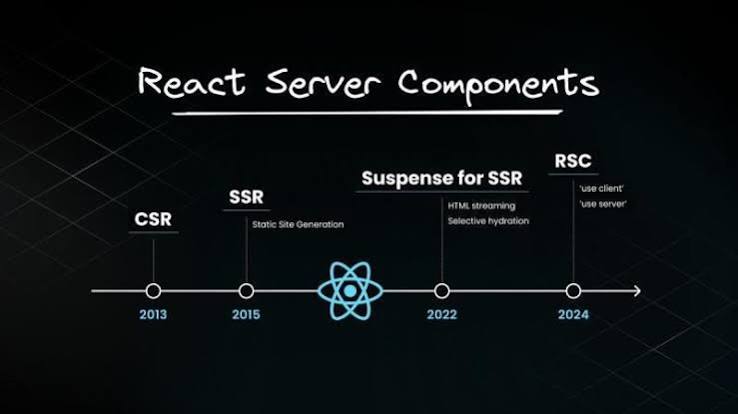
React Server Components stopped being experimental a while ago and the argument about whether to use them is largely over. Less client JavaScript, data fetched where it lives, a smaller bundle. On a content or commerce site the gains are real and measurable.
What is not over is the confusion at the boundary. Almost every RSC problem I have watched a team hit reduces to the same root: the boundary is not where they thought it was, or it does not behave the way a component boundary normally does.
Here are the ones that keep recurring.
1. “use client” marks an entry point, not a file
This is the single most common misunderstanding and the source of the most surprising bundle sizes.
Putting the directive at the top of a file does not make that one file a Client Component. It marks the point where the client boundary begins, and everything that file imports, and everything those files import, is pulled into the client bundle with it.
A single "use client" on a layout near the root of the tree quietly converts most of your application back into a normal client rendered React app, and the thing that makes this hard to notice is that everything still works. You only find it by looking at the bundle.
The practical rule is to push the directive as far down the tree as it will go. If a page is static except for one dropdown, the dropdown is the Client Component, not the page.
2. Server Components can be children of Client Components
People assume that once you cross into client territory you cannot come back. You can, through composition, and this is the escape hatch that fixes most bundle problems.
// Bad: the Client Component imports the server one, dragging it client side
"use client";
import HeavyServerThing from "./heavy-server-thing";

// Good: pass it in as children from a Server Component parent
// app/page.tsx  (server)
<InteractiveShell>
  <HeavyServerThing />
</InteractiveShell>
The Client Component receives already rendered output as a prop. It never imports the server code, so the server code never reaches the browser. This one pattern resolves a large share of the cases where teams conclude that RSC does not fit their app.
3. Props crossing the boundary must be serializable
Anything passed from a Server Component to a Client Component has to survive serialization. Functions do not. Class instances do not. Dates and Maps and Sets have historically been inconsistent depending on version, so verify rather than assume.
The failure mode that costs the most time is not the error. It is passing a large object because it was convenient, and shipping fields the client never uses into the payload. Every extra field is bytes on the wire for every request.
// avoid: whole record crosses, including cost, supplier, internal notes
<PriceWidget product={product} />

// better: only what the client actually renders
<PriceWidget price={product.price} currency={product.currency} />
There is a security dimension here too. Fields you would never render are still in the payload and readable in devtools. Treat the boundary as an API response, because that is what it is.
4. Context does not cross
React context is a client concept. A Server Component cannot consume it, which breaks the usual pattern of a theme, locale, or auth provider wrapping the whole tree.
The workaround people reach for is marking the provider as a Client Component, which is correct, but then everything that consumes it must also be client, and you are back to problem one.
The better shape is to stop treating context as the transport for server known values. Locale and user come from the request on the server and get passed as props. Context stays for genuinely client side state: an open menu, a form draft, a theme toggle the user flipped.
5. Waterfalls are easier to create than before
Fetching inside components is pleasant right up to the moment a nested component’s fetch depends on its parent’s result. Then requests serialise, and because each one is fast on its own nobody notices until the page is slow in aggregate.
Start independent requests in parallel at the level where you know all of them, and let Suspense handle arrival order.
// sequential: three round trips end to end
const user = await getUser(id);
const orders = await getOrders(id);
const recs = await getRecommendations(id);

// parallel: one round trip's worth of latency
const [user, orders, recs] = await Promise.all([
  getUser(id),
  getOrders(id),
  getRecommendations(id),
]);
Where a dependency is genuine, isolate that subtree behind its own Suspense boundary so it does not hold up everything else.
6. Streaming has an accessibility cost by default
This is the one that goes unmentioned in almost every RSC article, and it is the reason I keep writing about both topics together.
Content streaming in is a visual event. A skeleton is replaced by real content and a sighted user perceives progress. A screen reader user perceives nothing, because nothing announced that anything changed. From their side the page loaded, said very little, and then stopped.
The fix is small and almost nobody ships it: a polite status region that announces when a streamed section has arrived, and a fallback that is itself descriptive rather than a bare spinner.
<Suspense fallback={<p role="status">Loading recommendations</p>}>
  <Recommendations />
</Suspense>
Also watch focus. If a user tabs into a region while it is still a skeleton, the elements they were on get replaced, and focus lands wherever the browser decides. On a long streamed page that is disorienting enough to lose people.
7. Third party libraries are still the roughest edge
Any library using hooks, browser APIs, or context needs a client boundary. Most ecosystem packages now ship the directive themselves, but older ones do not, and the error you get points at your file rather than at theirs.
The usual pattern is a thin client wrapper per offending library, kept in one directory so the boundary is visible in the file tree rather than scattered through feature folders.
The summary I give teams
Server by default, client at the leaves. Pass rendered children rather than importing across the boundary. Send the minimum a component needs, not the object you happen to have. Parallelise fetches unless a dependency is real. And announce your streamed content, because the model that makes pages feel fast also makes them silent.
I build React and Next.js frontends, and I audit them for the accessibility gaps that server rendering quietly introduces. Write to me at serbeldiaz@gmail.com.
No responses yet